How to Check Backlinks in Google: 3 Free Methods
You know backlinks matter for SEO. But how do you actually see who's linking to your site? It's not as simple as it should be. Google doesn't hand you a clean, up-to-date list. You have to know where to look and what tools to use.
In this guide, you'll learn how to check backlinks in Google using three free methods. We'll walk through Google Search Console step by step, explain why the old link: operator has major limits, and cover the best free backlink checkers. By the end, you'll know exactly how to see backlinks pointing to your site, and when it makes sense to upgrade to a dedicated tool.
Method 1: How to Check Backlinks in Google Search Console
Google Search Console (GSC) is the most reliable free way to check backlinks in Google. It shows you the actual links Google has discovered for your site, straight from the source. No third-party estimates, just real data from Google's index.
Step 1: Set Up Google Search Console
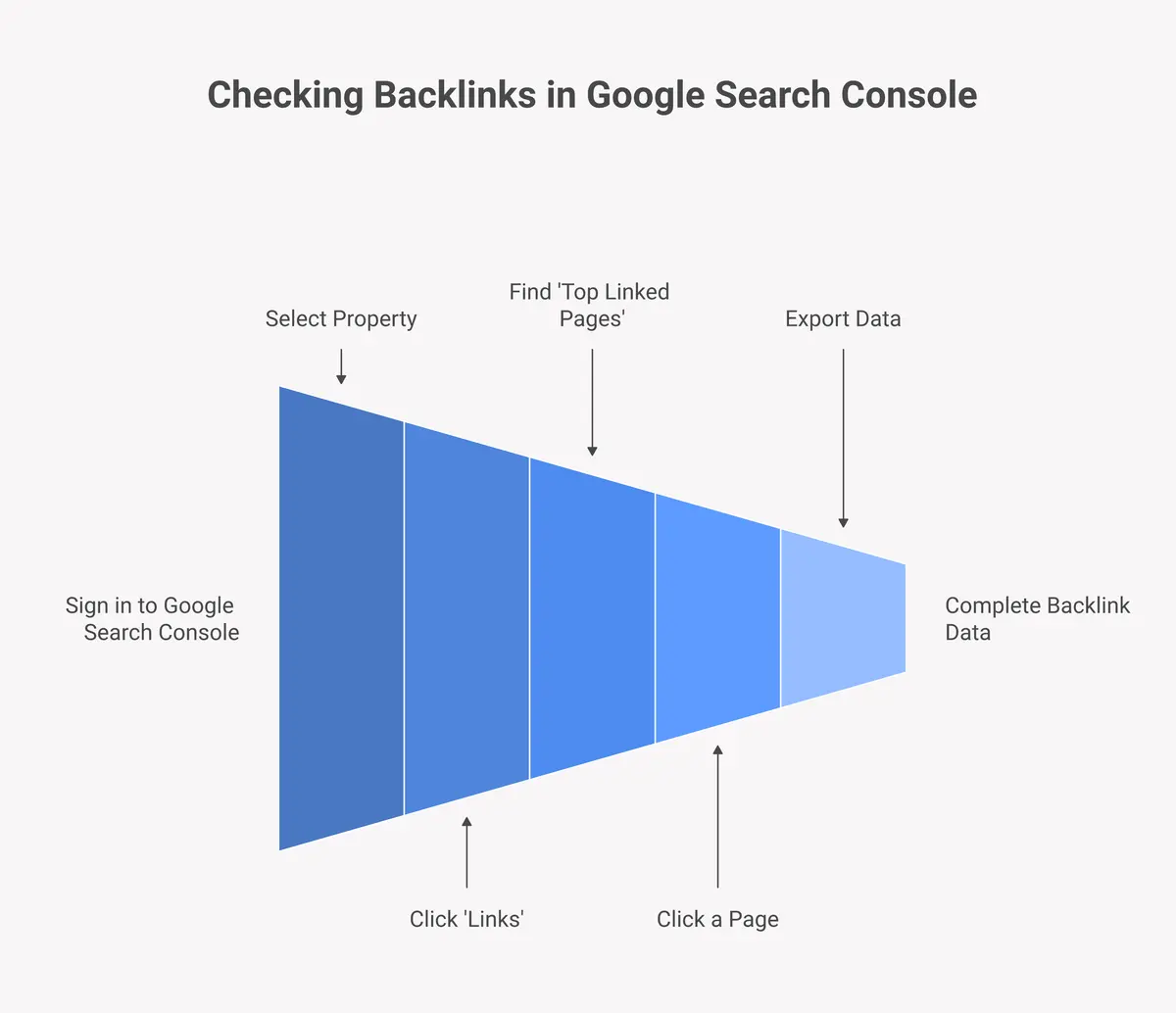
Go to search.google.com/search-console and sign in with your Google account. If you haven't verified your site yet, you'll need to add it as a property first. Google will ask you to verify ownership by adding a meta tag, uploading an HTML file, or connecting via Google Analytics.
Step 2: Navigate to the Links Report
Once you're inside your property, look at the left sidebar. Scroll down and click Links. This opens the Links report, which shows both external links (backlinks) and internal links for your site.
Step 3: Review Your External Backlinks
Under External Links, you'll see two key sections: Top linked pages and Top linking sites. Top linked pages shows which pages on your site have the most backlinks. Top linking sites shows which domains link to you most. Click any page or domain to drill into the full list of links.
Step 4: Export Your Backlink Data
Want a full list? Use the Export button at the top right of the report. You can download your backlink data as a Google Sheets file or CSV. This is helpful if you want to audit your links or track changes over time. According to Google's official documentation, this report shows the links Google has found most recently across your site.
Method 2: Does the Google link: Operator Still Work?
The Google link: operator (typing link:yoursite.com into Google's search bar) used to be a quick way to see who links to you. It doesn't work reliably anymore. Google stopped showing comprehensive results from this operator years ago, and today it returns only a tiny, incomplete sample of your actual backlinks.
What the link: Operator Shows
When you type link:example.com into Google, you get a handful of results, sometimes just a few pages. These aren't filtered by quality or recency. You have no way to export or analyze them. It's essentially useless for any real SEO work.
Why Google Retired It
Google hasn't officially removed the link: operator, but they've made clear it's not a supported feature for webmasters. Google's team confirmed years ago that it only returns a limited subset. Since then, Google Search Console has become the official way to check who links to your site.
When to Use It (If Ever)
Skip it. The link: operator wastes your time. Use Google Search Console instead for accurate google search console backlinks data. Save the operator-style searches for other queries where Google still supports them fully.
Method 3: Free Backlink Checkers
Several third-party tools let you check backlinks free, even without a paid subscription. These tools crawl the web independently and build their own backlink databases. You get more context than GSC alone, including domain authority scores and anchor text data.
Ahrefs Free Backlink Checker
Ahrefs offers a free backlink checker that shows the top 100 backlinks for any URL. You don't need an account. Just enter a domain and hit check. It's a great way to get a quick snapshot or to find competitors' backlinks without paying.
Moz Link Explorer
Moz's Link Explorer gives you 10 free queries per month with a free account. It shows domain authority, page authority, and a sample of inbound links. Good for a high-level overview, but the free tier limits how deep you can dig.
Ubersuggest
Ubersuggest by Neil Patel lets you check who links to my site with a few free daily searches. Enter your domain and click Backlinks. You'll see referring domains, anchor text, and whether links are dofollow or nofollow. The free version gives enough data to spot trends.
What Are the Limitations of Free Backlink Methods?
Free tools give you a starting point, but they all have significant gaps. Knowing these limits helps you decide when to use free methods and when you need something more powerful.
Incomplete Data
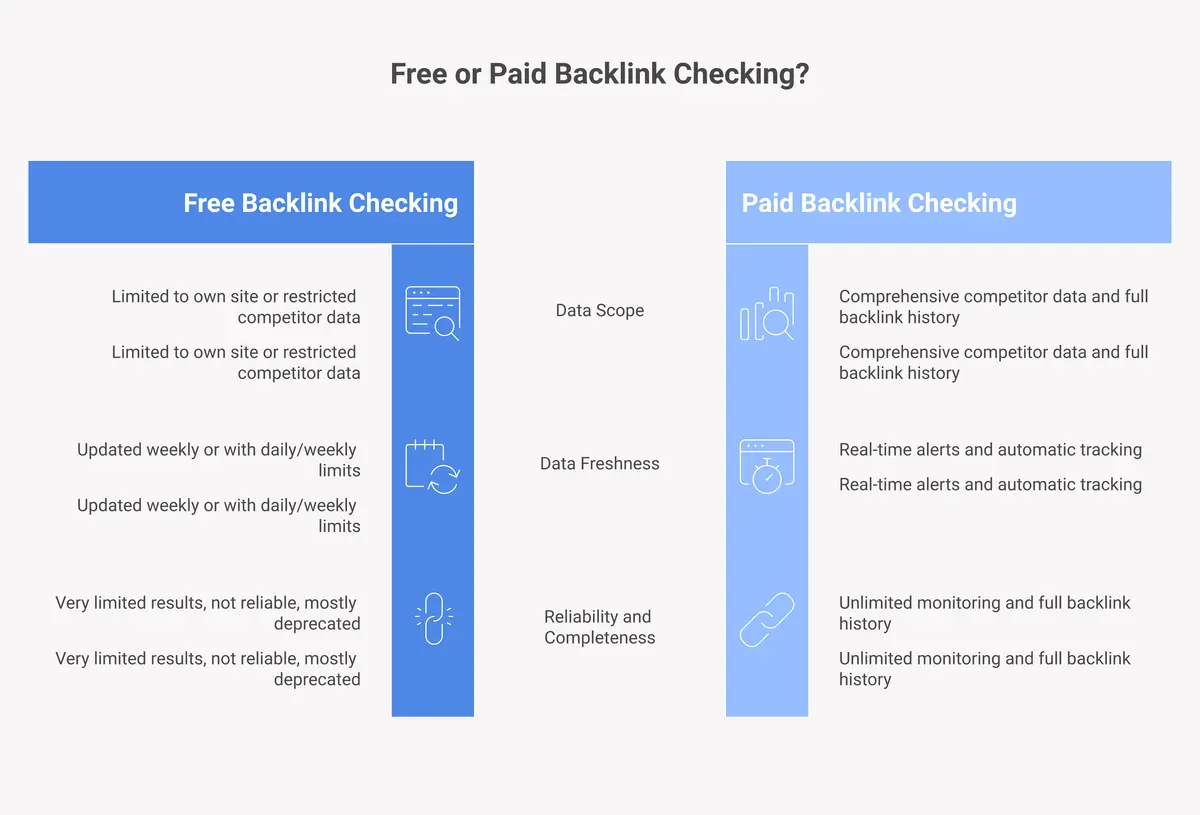
GSC only shows links Google has crawled and chosen to display. It doesn't show every backlink. Free tiers on third-party tools typically cap results at 100 to 500 links. For sites with thousands of backlinks, that's a small fraction of the full picture.
No Real-Time Alerts
None of the free methods tell you when you gain or lose a backlink. You have to manually check. If a high-value link disappears or a spammy site links to you, you won't know unless you happen to log in and check. That's a major blind spot for active SEO campaigns.
Limited Historical Data
Free tools rarely show you backlink history over time. You can't see when a link was first found or how your link profile has grown. For understanding SEO trends, you need historical data, and that's almost always behind a paywall.
No Competitor Monitoring
GSC only shows data for your own site. Free tiers on tools like Ahrefs and Moz limit how many competitor domains you can analyze per day. If you're trying to find competitors' backlinks at scale, free methods run out of runway quickly.
Why a Dedicated Tool Matters for Backlink Monitoring
Free methods are fine for a quick check. But if backlinks are part of your ongoing SEO strategy, you need a tool built specifically for monitoring, not just spotting.
A dedicated backlinks monitoring tool does things free tools can't. It tracks every new and lost backlink automatically. It sends you alerts the moment something changes. It keeps a full historical record so you can spot patterns over time. And it lets you monitor your competitors alongside your own site, all in one dashboard.
The DailyBacklinks monitoring tool is designed for exactly this. Instead of logging into three different tools and manually comparing spreadsheets, you get one clean view of your entire backlink profile, updated automatically. It's the upgrade that makes your SEO work proactive instead of reactive.
Monitor all your backlinks automatically ?
Start Checking Your Backlinks Today
You now have three solid ways to check backlinks in Google for free. Start with Google Search Console for the most accurate data. Add a free tool like Ahrefs or Moz for extra context. And skip the link: operator entirely. It's not worth your time.
When you're ready to move beyond manual checks, the DailyBacklinks monitoring tool handles everything automatically. You'll always know what's linking to you, what's changed, and where the next opportunity is.
Frequently Asked Questions
How do I check backlinks in Google Search Console?
Log in to Google Search Console, select your property, and click "Links" in the left sidebar. Under External Links, you can view your top linked pages and top linking sites. Use the Export button to download the full list as a CSV or Google Sheets file.
Is there a free way to check who links to my site?
Yes. Google Search Console is completely free and shows real backlink data from Google. Third-party tools like Ahrefs' free backlink checker and Moz Link Explorer also offer free tiers with limited results. For full data, a paid tool is needed.
Does the Google link: operator still work?
Not reliably. The link: operator only returns a small, incomplete sample of backlinks. Google has not maintained it as a full-featured tool for years. Use Google Search Console instead for accurate backlink data.
How do I see backlinks for a competitor's website?
Google Search Console only shows data for sites you own. To check competitor backlinks, use a third-party tool like Ahrefs, Moz, or Ubersuggest. Free tiers give limited results. A dedicated backlink checker gives you fuller competitive data.
Why is backlink monitoring important for SEO?
Backlinks are one of Google's top ranking factors. Monitoring them lets you know when you gain valuable new links, spot and disavow toxic links before they hurt your rankings, and track the impact of your link-building efforts over time.